Disclaimer
This document contains a series of exercises accessing, and in some cases overwriting, your boot loader. There's a significant possibility of overwriting your existing boot loader, which can lead to lost time and even lost data. There may be other risks.
You use this document at your own risk. I am not responsible for any damage or injury caused by your use of this document, or caused by errors and/or omissions in this document. If that's not acceptable to you, you may not use this document. By using this document you are accepting this disclaimer.
Executive Summary
Grub is a world-class boot loader with insufficient documentation. In many ways it blows the doors of LILO. For instance, it's MUCH easier to use Knoppix to rebuild a grub boot loader than to rebuild a LILO boot loader. However, until you're comfortable with grub, it might seem just the opposite. All too often grub dumps you at a
grub> prompt with no hint of what you should do. You might have heard that a successful reboot is just three commands away, but which commands? The state of grub's documentation is such that you can't figure it out unless you already know grub.
That catch 22 is the very purpose of this document. This document will to give you enough grub expertise that you can create a grub boot floppy on a working machine with grub installed (not necessarily as the bootloader, just installed), and use that floppy to bust back into a Linux machine with a blown bootloader, and then use that floppy to actually install grub as the bootloader.
This document does not discuss using grub to boot or dual boot Windows, mach, BSD, or other non-Linux operating systems. I might write on that subject later. But in the meantime, once you're familiar with the principles and practices of grub, given some study of existing documentation you'll probably be able to use grub to boot non-Linux operating systems.
Making a Simple grub Booter Floppy
Much of this document discusses what to do at the
grub> prompt, so you need to be able to get to it. The easiest way to get to the
grub> prompt is through a simple grub boot floppy, which can be created on
any machine with grub installed, whether or not that machine actually boots with grub. The following bash session shows exactly how to make a simple grub boot floppy:
[root@mydesk grub]# cd /boot/grub
[root@mydesk grub]# cat stage1 stage2 > /dev/fd0u1440
[root@mydesk grub]#
|
One word of caution. In 1990 you could buy 50 floppies and more than 45 of them would be good. Today you're fortunate if half the brand new floppies you buy are good enough to reformat and use. 1990 floppy drives cost close to $100.00, and worked quite well for a long time. Today's floppy drives are 1/10 that price, and it seems they work only 1/10 as long. So create several grub boot floppies, and if you get a read error during boot, use a different floppy.
Don't actually do it yet, but one way you could get to a
grub> prompt would be to reboot the machine while the grub boot floppy is inserted, if necessary tweak the bios to boot off the floppy, and let the reboot proceed. But first, there is some information you absolutely need to know...
What You Absolutely Need to Know
In order to use grub to boot a computer, you need to know the following:
- The partition containing the kernel
- Within that partition, the directory path and filename of the kernel
- The partition containing /sbin/init
In addition, you might need the partition, path and filename of the initrd file, but usually this is not necessary with grub.
| NOTE
I have seen cases in which a kernel would kernel panic without an initrd statement, and would boot with it. The interesting thing is, once I got it booting, I could remove the initrd statement, rerun grub's setup, and it would now boot without the initrd statement. If you get kernel panics and it isn't obvious why, don't hesitate to insert an initrd statement.
|
Now let's take a look at an example. Imagine a system in which
/dev/hda1 is mounted as
/boot, and
/dev/hda9 is mounted as
/. Within
/boot the kernel filename is
vmlinuz-i686-up-4GB. Now let's answer the four questions:
- The partition containing the kernel = /dev/hda1, or (hd0,0) in grub-speak
- Within that partition, the directory path and filename of the kernel = /vmlinuz-i686-up-4GB (Remember, /dev/hda1 is mounted directly to /boot, so it contains the kernel directly)
- The partition containing /sbin/init is /dev/hda9
In that case, here are the grub commands you would input to boot that system:
grub> root (hd0,0)
grub> kernel /vmlinuz-i686-up-4GB root=/dev/hda9
grub> boot
The preceding is usually sufficient to boot a Linux box. The standalone
root statement tells the partition containing the kernel. The
kernel statement describes the path and filename,
within the partition containing the kernel of the kernel. The argument to the
root= argument to the
kernel statement tells the partition containing
/sbin/init, which of course turns out to be the root partition in the booted system.
Be careful of these duelling
root keywords. The standalone one is the root as seen from grub, and contains the kernel. The argument to the
kernel statement is the root as seen from the fully booted system, and contains
/sbin/init.
Be careful also of where you use grub partition notation and where you use Linux partition notation. You use grub partition notation (
(hd0,0)) everywhere except the
root= argument to the
kernel statement. In the
root= argument you use the Linux partition notation. Note that in Linux notation, the drive starts with
a for the first IDE port master, then
b for the first IDE port slave, then
c for the second IDE port master, and
d for the second IDE port slave, on and on throughout your IDE ports. In Linux notation, the partition number within the drive starts with 1.
In grub partition notation, the first accessible hard drive is
(hd0), the next accessible hard drive (even if it's on the 3rd, 4th or higher IDE port) is
(hd1), and so forth. In grub partition notation, the partition number is zero based. Thus:
/dev/hda1 is the same partition as (hd0,0)
Occasionally you'll need to specify an
initrd, although this is rare. If so, after the kernel statement and of course before the
boot statement, insert the following:
initrd /initrd-i686-up-4GB.img
It's absolutely essential that if you do use an
initrd statement, that the
initrd file you reference must match the kernel you referenced earlier.
| NOTE
I have seen cases in which a kernel would kernel panic without an initrd statement, and would boot with it. The interesting thing is, once I got it booting, I could remove the initrd statement, rerun grub's setup, and it would now boot without the initrd statement. If you get kernel panics and it isn't obvious why, don't hesitate to insert an initrd statement.
|
Another documented way to boot from grub is to put the grub-root in the kernel statement itself instead of as a separate entity:
grub> kernel (hd0,0)/vmlinuz-i686-up-4GB root=/dev/hda9
grub> boot
If you do that, you'll need to also specify the grub root (
(hd0,0)) on any
initrd statement.
Booting Up Foreign Distros
Let's say you're a United States English speaker using grub to bust back into a Knoppix machine that lost its boot loader. The commands discussed previously would put you in Knoppix just fine, but the error messages and even the console keyboard would be German (Deutsch). If you wanted to boot up in American English, you'd add the argument
lang=us to the kernel statement, like this:
grub> kernel (hd0,0)/vmlinuz-i686-up-4GB root=/dev/hda9 lang=us
grub> boot
or
grub> root (hd0,0)
grub> kernel /vmlinuz-i686-up-4GB root=/dev/hda9 lang=us
grub> boot
The Single Partition Configuration
The preceding example detailed a system with a dedicated
/boot partition. Especially in these days of modern bioses that can boot past cylinder 1024, many people don't use a separate partition for
/boot. Imagine if the root partition were
/dev/hda1, and
/boot was just another directory on that partition. In that case, here are the commands you'd use:
grub> root (hd0,0)
grub> kernel /boot/vmlinuz-i686-up-4GB root=/dev/hda1
grub> boot
The only difference is here the grub root is the same as the booted system root.
Having Grub Do Your Research For You
Often you know the partition containing the kernel, the kernel directory and name, and which partition mounts to root after boot. In that case booting Linux from grub is trivial.
Other times you're not so lucky. Like when you accidentally messed up LILO, or when you or someone else installed Windows, inadvertently overwriting the boot loader on the MBR. That's when you need grub the most, but that's also when you're least likely to know the partition containing the kernel, the partition that will ultimately be root, and the name of the kernel. Luckily, grub can help.
Your first step is to find the partition containing the kernel and the partition containing
/sbin/init. Now type the following at the
grub> prompt:
find /sbin/init
On a machine with three different Linux OS's installed, the answer would come back something like this:
grub> find /sbin/init
(hd0,8)
(hd0,11)
(hd1,11)

grub>
|
In the preceding example, you've found three different partitions containing
/sbin/init:
Grub partition specification
| Linux partition specification
|
(hd0,8)
| /dev/hda9
|
(hd0,11)
| /dev/hda12
|
(hd1,11)
| /dev/hde12
Note: I infer that hd1 maps to hde because on this particular machine there are two hard disks, one at hda and one at hde.
|
Next, find all partitions containing the kernel. Our first attempt assumes that at least one kernel will have filename
vmlinuz.:
grub> find /vmlinuz
(hd0,0)
(hd0,11)
(hd1,11)

grub>
|
Then perform the same search for
vmlinuz in a directory called
/boot:
grub> find /boot/vmlinuz
(hd0,11)
(hd1,11)

grub>
|
Here we find only two of the three we found in the first attempt, because on this machine,
(hd0,0) is mounted as
/boot on one of the OS's.
Grub's
find command is limited. It can find only regular files, not directories. Usually the entire directory path must be specified, although for some reason it finds a couple
/boot/vmlinuz when you use find on
/vmlinuz. Don't count on that behavior.
Another technique for finding info in grub is to use its file completion feature. Let's say you know the kernel is on
(hd0,0) and the kernel file begins with
vml. Press the tab key after issuing this partial command:
null (hd0,0)/vmlinuz
Grub performs file completion much like you see at a Linux command prompt.
grub> null (hd0,0)/vmlinuz
Possible files are: vmlinuz vmlinuz-2.6.3-7mdk vmlinuz-2.6.3-7mdk-i686-up-4GB
vmlinuz-i686-up-4GB

grub>
|
In the preceding, the word
null is not a keyword, but instead a word chosen because it is not a keyword. Instead of "null", you could have used "whatever" or "bogus" or any other non-keyword. Once you get the list, you can complete a little more and then press tab again, just like at a bash prompt. By doing so you minimize the likelihood of transcription errors.
Occasionally grub won't easily give you all the necessary information. If you need more information than grub can conveniently provide, boot Knoppix. See Troubleshooters.Com's
Knoppix Knowhow site for details.
Making a Full grub Boot Floppy
In this document's first article you created a simple Grub boot floppy without a filesystem. This is adequate to boot a computer, but not to install grub on the computer. Installing grub requires a boot floppy with grub on a filesystem. You can do that on any Linux box on which grub is installed. The following are the steps:
[root@mydesk root]# mkfs -t ext2 -c /dev/fd0u1440
[root@mydesk root]# umount /dev/fd0
[root@mydesk root]# umount /dev/fd0u1440
[root@mydesk root]# mkdir /mnt/test
[root@mydesk root]# mount /dev/fd0u1440 /mnt/test
[root@mydesk root]# mkdir -p /mnt/test/boot/grub
[root@mydesk root]# cp /boot/grub/stage1 /mnt/test/boot/grub
[root@mydesk root]# cp /boot/grub/stage2 /mnt/test/boot/grub
[root@mydesk root]# chmod a-w /mnt/test/boot/grub/stage2
umount /dev/fd0u1440
[root@mydesk root]# grub
grub> root (fd0)
grub> setup (fd0)
grub> quit

[root@mydesk root]#
You now have a bootable grub floppy with which you can boot a computer. One more thing should go on the floppy -- an example
menu.lst. The
menu.lst file is what brings up a "grub menu", and is vital for actually installing the grub bootloader on another computer. On the computer you need to boot, you can edit the
menu.lst file to produce a grub menu on boot, and to actually install grub on the system. Note that the example
menu.lst shoud NEVER be copied to the floppy before all the steps listed above this paragraph. Here is a typical session showing how to perform the copy. Note that once again, a
mount and
unmount must be performed.
[root@mydesk root]# mount /dev/fd0u1440 /mnt/test
[root@mydesk root]# cp -p /usr/share/doc/grub-doc-0.93/menu.lst /mnt/test/boot/grub/
stage1  stage2
[root@mydesk root]# cp -p /usr/share/doc/grub-doc-0.93/menu.lst /mnt/test/boot/grub/menu.lst.example
[root@mydesk root]# umount /dev/fd0u1440
[root@mydesk root]#
Installing grub From Floppy
Do not perform this exercise until you've practiced the earlier exercises. Knowledge of the operation of the grub command line interface is vital to creating and installing a menu driven grub.
| WARNING
This exercise walks you through creating a floppy based grub boot floppy on a grub installation on computer 1, and then using that floppy to boot and configure grub on computer 2. It WILL wipe out any existing boot loader from computer 2. Hopefully it will replace that boot loader with grub, but there are no guarantees. In fact, this document addresses only Linux grub setups, so if you have Windows or BSD installed, this document cannot help you recover.
Therefore, computer 2 MUST be an experimental computer whose data and OS you can afford to lose.
|
In the
Making a Full grub Boot Floppy exercise you created a boot diskette with
stage1,
stage2, and an example
menu.lst named
menu.lst.example. Now it's time to use that floppy on another system. As mentioned in the preceding warning, that other system must be an experimental system whose boot loader you can afford to overwrite, possibly unsuccessfully.
Insert the full grub boot floppy in the experimental computer, shut the computer down in an orderly fashion, and reboot the computer. During BIOS boot, make sure the computer's first boot drive is the floppy.
It is very likely that the the other system has grub installed. To temporarily move its files aside, do the following:
mv /boot/grub /boot/orggrub
mv /sbin/grub /sbin/orggrub
mv /sbin/grub-install /sbin/orggrub-install
Basically, rename directory
/boot/grub, and then rename all grub executables. In this way you're simulating a machine that has never had grub installed, yet you can "put back" the files with a couple more renames. However, it is not so simple to "put back" the MBR.
The basic procedure is as follows:
- Boot from the grub floppy
- Copy files from the floppy to /boot/grub on the hard disk
- Configure /boot/grub/menu.lst for this computer
- Reboot from floppy, and install grub
Boot from the grub floppy
grub> root (hd0,0)
grub> kernel /vmlinuz-i686-up-4GB root=/dev/hda9
grub> boot
As mentioned before, if booting to a foreign language distro, use the appropriate
lang= kernel argument so that you can work in your native tongue. If everything went right, your experimental system is now booted.
Copy files from the floppy to /boot/grub on the hard disk
First make sure there's no
/boot/grub. If there is, rename it, because you sure don't want to overwrite it just to perform this exercise.
Now perform the following commands:
mkdir /mnt/test
mount /dev/fd0u1440 /mnt/test
cp -Rp /mnt/test/boot/grub /boot
Configure /boot/grub/menu.lst for this computer
If you began this document as a grub newbie, the sample
menu.lst that ships with grub would have been useless to you. What a difference a few exercises can make. You now know how to boot a computer from the
grub> prompt. You know the difference between the grub root and the root directory seen by Linux after bootup. You know how to structure a grub
kernel statement.
A
menu.lst file is basically just the same list of commands you'd use at the
grub> prompt, except that the
boot command is not included. The example
menu.lst has commands for installing operating systems from mach to Windows, and it even has an entry that installs grub on the system and another that changes the menu colors. All of that is extraneous. What you want to do is delete all the non-Linux stuff, and configure the Linux commands to match your experimental machine's kernel partition, Linux root partition, and kernel filename. The following is an example of such an edited example file saved as
menu.lst:
#
# Sample boot menu configuration file
#

# Boot automatically after 30 secs.
timeout 30

# By default, boot the first entry.
default 0

# Fallback to the second entry.
# fallback 1    # BE SURE TO COMMENT THIS OUT!!!!!!!!!!!!!!

# For booting GNU/Linux
title  GNU/Linux
root (hd0,0)
kernel /boot/vmlinuz-2.6.7 root=/dev/hda1 lang=us
|
A few notes are in order:
- BE SURE to comment out the "fallback 1", because there is no choice 1, only a choice 0.
- The default 0 statement simply points to which choice will run if the user makes no choice within the timeout period.
- The lang= is unnecessary unless you're booting up a foreign distro and want to see it in your native language.
- The root (hd0,0) needs to be adjusted to point to the partition containing the kernel.
- The root=/dev/hda1 needs to be adjusted to point to the partition that will be mounted as root after booting. Note that it is expressed in Linux notation, not in grub notation.
- The kernel statement points to the kernel relative to the grub root. In the preceding file it points to /boot/vmlinuz-2.6.7 in the Linux root partition. If Linux used a partition just for /boot, and that partition were /dev/hda1 as is typical of boot partitions, then the kernel would point to /vmlinuz-2.6.7 instead of /boot/vmlinuz-2.6.7, because the file would be on the root of the boot partition, and would become subservient to /boot only after the partition is mounted by Linux.
- Grub's default menu file is /boot/grub/menu.lst. You can use a different file, but it would require jumping through quite a few hoops. Use the default.
- None of this is new to you. You already did all of this at the grub> prompt in previous exercises.
Your
/boot/grub/menu.lst file is now complete. If you created it correctly, you can now install grub from your floppy:
Reboot from floppy, and install grub
Insert your full grub boot floppy in the experimental machine, and reboot. The machine boots to the floppy, and you are presented with the
grub> prompt. From there, installation is easy, assuming you've done the previous steps correctly:
grub> root (hd0,0)
grub> setup (hd0)
grub> reboot
|
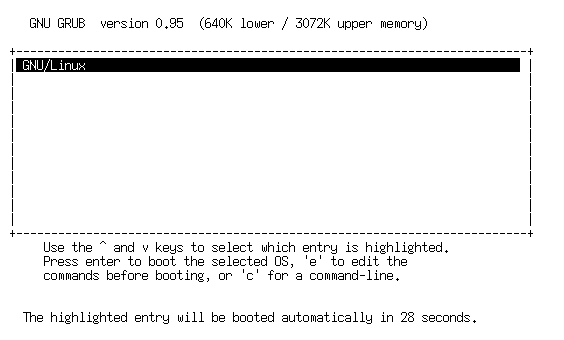
The machine reboots again, and if you remove the floppy, you are presented a 1 item grub menu. This is what it looks like:
Pressing Enter on that item boots the kernel listed in your
menu.lst. A few notes are in order:
- Never remove the floppy while the floppy light is on
- If you fail to remove the floppy before the reboot reaches the bootloader, it will boot from floppy again. In that case, just boot from floppy as you have in prior exercises, and then remove the floppy and reboot the machine to get the menu.
Summary
Thats it. You created a bootable floppy with
stage1,
stage2 and an example menu file, and used that floppy to install a grub bootloader on a machine. This is how you can take a machine with a blown bootloader and configure it to boot with grub.
However, your "grub installation" falls short. None of the grub executables are there:
- grub
- grub-floppy
- grub-install
- grub-md5-crypt
- grub-reboot grub-terminfo
Also, many files normally placed in
/boot/grub are not there:
- device.map
- e2fs_stage1_5
- jfs_stage1_5
- minix_stage1_5
- reiserfs_stage1_5
- xfs_stage1_5
The other thing you don't have is the documentation that usually comes in
/usr/share/grub.
Once you get the machine booting in a stable manner, you'll probably want to install grub from a package manager or by compiling the source. Be sure to back up your existing
/boot/grub/menu.lst.
Working With a Fully Installed grub
You don't want to reboot to floppy just to get to a
grub> prompt or to make changes to the bootloader on your MBR. Once you've installed the full grub package you don't need to. You can use
grub-install to install a newly configured boot loader without resorting to your boot floppy. You can use
grub to view the results of a new
menu.lst.
After you've installed grub (or restored the original installation by undoing the renames), edit your
menu.lst , insert a second entry that boots the 2.4 kernel instead of the 2.6, name each entry for its kernel number, and restore the. Here is the resulting file:
#
# Sample boot menu configuration file
#

# Boot automatically after 30 secs.
timeout 30

# By default, boot the first entry.
default 0

# Fallback to the second entry.
fallback 1

# For booting GNU/Linux
title  26
root (hd0,0)
kernel /boot/vmlinuz-2.6.7 root=/dev/hda1 lang=us

# For booting GNU/Linux
title  24
root (hd0,0)
kernel /boot/vmlinuz-2.4.27 root=/dev/hda1 lang=us
|
The preceding file has two boot choices: One for the 2.6 kernel (appropriately named 26) and one for the 2.4 kernel (appropriately named 24). It defaults to 26, but if for some reason 26 won't boot it falls back to 24.
Once the file is saved, perform the following command:
grub-install /dev/hda1
| NOTE
To get the same result, you can also run grub, either from a command line or via a grub boot floppy, and perform the following command sequence:
grub> root (hd0,0)
grub> setup (hd0)
The preceding assumes that the kernel is located on (hd0,0), which is otherwise known as /dev/hda1, and that you're installing it to the MBR of the first hard disk, also known as /dev/hda.
|
The next time you boot your computer, you'll see choices 26 and 24, and they'll do the right thing, as follows:
If you want to view the menu without rebooting, try this command:
grub --config-file \(hd0,0\)/boot/grub/menu.lst
In the preceding, note that you need to escape the parentheses of the grub partition because otherwise the shell will interpret those parentheses as special characters. Perform that command and you'll see the menu, which looks like the following:
However, you cannot actually boot from grub run on the command line.
Options from the grub menu
We all hope every item on the menu produces a clean boot. If not, you can either edit individual commands in a given menu choice by pressing the
e key, or drop down to the grub command prompt by pressing the
c key. Generally speaking, you edit commands if you suspect the menu choice is close to a correct configuration, and you drop directly to the grub command prompt if you suspect the menu item to be totally wrong, or if you need the facilities of grub's
find command or its command completion feature.
 General Linux Guides/Links
  Canonical – Ubuntu
  Canonical – Kubuntu Linux
 Canonical Edubuntu Linux
 Novell – SUSE Linux
 Redhat : Fedora Linux
 Mandriva Linux
 Gentoo Linux
 Linspire / Freespire
 Xandros Linux
 Knoppix Linux
 Debian GNU/Linux
 Slackware Linux
 FreeBSD Linux
  Linux Mint
  DesktopBSD Linux
  Saboyon Linux
  PC-BSD Linux

 Top 40 singles Uk